
The right planner should do the boring part for you — the averaging, the flagging, the recopying — so the only thing left on your plate is teaching. These twelve do exactly that.
Every August the same quiet math happens: a teacher opens a fresh paper planner, and within three weeks it's a graveyard of crossed-out plans, sticky notes, and a grade column added up by hand at 9pm. The planning was never the problem. The recopying was — moving the same roster, the same schedule, the same running totals from one page to the next, all year long.
A good digital teacher planner ends that. Mark a grade once and the average updates. Log an absence and the attendance rate moves. Change your schedule and every linked page follows. For the 2026-2027 academic year, the strongest options come in three flavors — Google Sheets/Excel, GoodNotes for iPad, and Notion — and below we've ranked twelve picks from the Reassurix Etsy shop so you can match one to the way you already work.
Google Sheets + GoodNotes + Notion in one download · instant delivery
How we ranked these teacher planners
Not every “best digital teacher planner 2026-2027” list is built the same way. We judged each pick on the things that actually save a teacher time across a real school year, not just how pretty the cover looks:
The best planners use built-in formulas or databases — grade averages, attendance percentages, and IEP progress that update themselves. A planner that only stores numbers is a paper planner with a screen.
A hyperlinked academic calendar (August 2026 through July 2027) means you tap to jump between months and weeks instead of scrolling. Pre-dated layouts save you the September setup ritual entirely.
A planner is only used if it opens where you work — a Chromebook cart, a personal iPad, or the browser tab you keep open all day. We flagged the exact app each pick is built for.

The 7 best digital teacher planners for 2026-2027
These are the core teaching planners — lesson planning, grade books, attendance and IEP tracking — sorted so you can jump straight to your format.
1Best overall — Digital Teacher Planner for Google Sheets & Excel
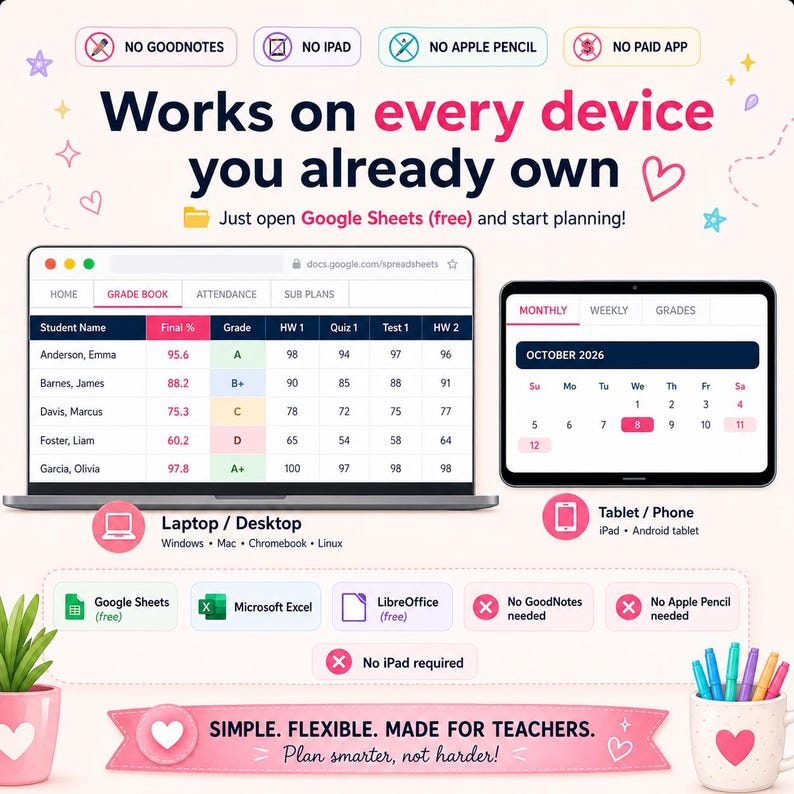
If you want one planner that thinks, start here. This Google Sheets & Excel classroom organizer bundles a hyperlinked lesson planner, an auto-averaging grade book, an IEP tracker, and a class-roster hub into a single file. Because it lives in Google Sheets, it opens identically on a laptop, a Chromebook, or your phone — no app purchase, no login wall.
2Best value — Digital Teacher Planner Bundle (all three formats)
Can't decide between Sheets, GoodNotes and Notion? The Digital Teacher Planner Bundle 2026-2027 hands you all three in one download, so you can plan lessons in Google Sheets, hand-annotate on the iPad in GoodNotes, and manage your term dashboard in Notion — without paying for three separate products. It's the pick for teachers who genuinely switch devices during the day.
3Best for iPad handwriting — GoodNotes Teacher Planner
Prefer an Apple Pencil to a keyboard? This GoodNotes iPad teacher planner is a hyperlinked PDF with a lesson-and-assignment layout that feels like paper but jumps between tabs with a tap. Import it into GoodNotes (or Notability/Xodo) and write your plans by hand, all year.
4Best vertical layout — Digital Teacher Planner (Vertical) for GoodNotes & Notability
Teachers who think in columns will like the vertical GoodNotes & Notability planner. Same IEP tracker and classroom-organizer backbone, arranged as a vertical daily/weekly spread that suits secondary teachers juggling multiple periods.
5Best for Notion — Notion Teacher Planner 2026-2027
If your whole life is already in Notion, keep your teaching there too. The Notion Teacher Planner 2026-2027 is a digital classroom organizer — lesson planner, grade book, and IEP tracker as linked databases. It earned both of this shop's five-star reviews from teachers who use it daily. Learn more about the app at Notion.
6Best Notion for tracking — Notion Teacher Planner Template (Assignment, Grade & Attendance)
Want the data side turned up? This Notion teacher template centers on assignment, grade and attendance trackers that roll up automatically — ideal if your gradebook and roll call are the parts that eat your evenings.
7Prettiest — Digital Teacher Planner in Sage, Blush & Clay
A planner you actually enjoy opening gets used. The Sage Blush & Clay hyperlinked planner wraps the full academic-year lesson layout in a calm, minimal palette — the same functionality as pick #1, dressed for people who care about aesthetics.
Every planner $7.99 · bundle $15.99 · instant digital download
5 bonus picks every teacher's toolkit needs
The planner is the center of gravity, but these five Reassurix tools cover the jobs a lesson planner shouldn't have to — roll call, personal finances, work-life balance, and templates you can hand straight to students.
8Student Attendance Tracker Bundle (live dashboard)
A dedicated attendance tracker for Google Sheets & Excel with a live dashboard, at-risk flags and 12 month tabs. Perfect if your planner handles lessons and you want roll call in its own robust system.
9Ultimate Budget & Debt Payoff Tracker
Teacher pay stretches further with a plan. This budget & debt payoff tracker (Google Sheets/Excel dashboard) helps you manage classroom-supply spending and personal finances in one place.
10Notion Life OS — work-life balance in one hub
Teaching bleeds into evenings unless something holds the rest of your life. The Notion Life OS is a second-brain system for goals, projects and finances — the off-the-clock counterpart to your teacher planner.
11Student Assignment Tracker (to share with your class)
Hand your students a system that matches yours. The Student Assignment Tracker for Google Sheets & Excel is a clean homework and deadline organizer — great for advisory, homeroom, or a study-skills unit.
12Back to School Student Planner 2026-2027 (GoodNotes)
Rounding out the toolkit, the Back to School Student Planner is a hyperlinked GoodNotes/iPad PDF you can recommend to older students — or use yourself for PD and grad-school deadlines.
Google Sheets vs. GoodNotes vs. Notion: which format fits you?
The format decision matters more than the cover. Here's the honest comparison teachers ask for.
| What matters | Google Sheets / Excel | GoodNotes (iPad) | Notion |
|---|---|---|---|
| Auto grade & attendance math | Yes, built-in formulas | No, handwritten | Yes, rollups |
| Handwriting with a stylus | No | Yes, best-in-class | Limited |
| Works on laptop & Chromebook | Yes | No (iPad app) | Yes |
| Works offline | Excel yes / Sheets partial | Yes | Partial |
| Extra app required | No | Yes, GoodNotes | Free Notion account |
| Best for | Data-driven planning | Pen-and-paper feel | All-in-one dashboards |
Short version: choose Google Sheets if you want the planner to do the arithmetic, GoodNotes if you want to write by hand on an iPad, and Notion if you want lessons, grades and life in one linked workspace. Undecided? The bundle removes the choice.
Who these digital teacher planners are for
These fit K-12 classroom teachers who want lesson plans, grades and attendance to stop living in three different notebooks; special-education teachers who need a real IEP and accommodations log; homeschool parents documenting a year of learning; and tutors or co-op leaders who want a professional record without a district portal. If you teach and you've ever recopied a roster by hand, one of the twelve above will pay for itself in the first month.
How to set up your planner in under 10 minutes
- Buy and download — delivery is instant after checkout on Reassurix.
- For Google Sheets, open the included link and choose File → Make a copy for your own private version in Google Drive.
- For GoodNotes, import the PDF into the app and start writing on the hyperlinked pages.
- For Notion, duplicate the template into your workspace with one click.
- Add your classes and roster once — every linked page, average and tracker fills in from there.
Frequently asked questions
What is the best digital teacher planner for 2026-2027?
It depends on your app. For a spreadsheet that auto-calculates grades and attendance, the Reassurix Digital Teacher Planner for Google Sheets & Excel is the strongest all-rounder. Handwriters should pick the GoodNotes planner; Notion users the Notion planner. The bundle includes all three.
Is a Google Sheets or GoodNotes teacher planner better?
Google Sheets wins for automatic grade averages, attendance percentages and IEP tracking, and for switching between laptop and phone. GoodNotes wins for handwriting on an iPad with an Apple Pencil. Many teachers keep both — which is why the bundle exists.
Do digital teacher planners work on both iPad and laptop?
Yes. Sheets and Excel planners open on any laptop, Chromebook or phone browser. GoodNotes and Notability planners are PDFs for iPad note-taking apps. Notion planners run in any browser and in the Notion app on every device.
What should a 2026-2027 teacher planner include?
A hyperlinked academic calendar (Aug 2026–Jul 2027), weekly lesson pages, a grade book, an attendance tracker, an IEP or accommodations log, class rosters, and a classroom organizer. Pre-dated layouts remove September setup.
Are digital teacher planners a one-time purchase?
Yes. Each Reassurix planner is an instant download you buy once and reuse. Sheets and Excel versions are duplicated with File → Make a copy, so a fresh copy each school year costs nothing extra.
How much does a digital teacher planner cost?
Individual Reassurix planners are $7.99 and the all-format bundle is $15.99, both often discounted — a one-time cost versus paper planners you rebuy every year.
Final thoughts
A planner can't teach your classes or grade your essays. But the right digital teacher planner for 2026-2027 can quietly delete an entire category of busywork — the recopying, the by-hand averaging, the “where did I write that” scramble — and hand those evenings back to you. Pick the format that matches how you already work, set it up once, and let it carry the arithmetic for the rest of the year.
Keep reading: our companion guides to the best ADHD planners for 2026 and the best student assignment trackers for Google Sheets.
See every format, layout and page on the Reassurix Etsy shop — and start the 2026-2027 year already organized.
Get the Teacher Planner Bundle →
Join the conversation