
A planner remembers what you wrote down. A tracker tells you what's due next, what's overdue, and what you can safely ignore until Thursday. That difference is the whole game.
The assignments were never really the problem. It's the tracking — the mental juggling of six classes, a dozen due dates, and that one reading you're 80% sure isn't due yet. Miss the wrong one and a solid grade quietly slips, not because the work was hard, but because it fell off the edge of your memory on a busy week.
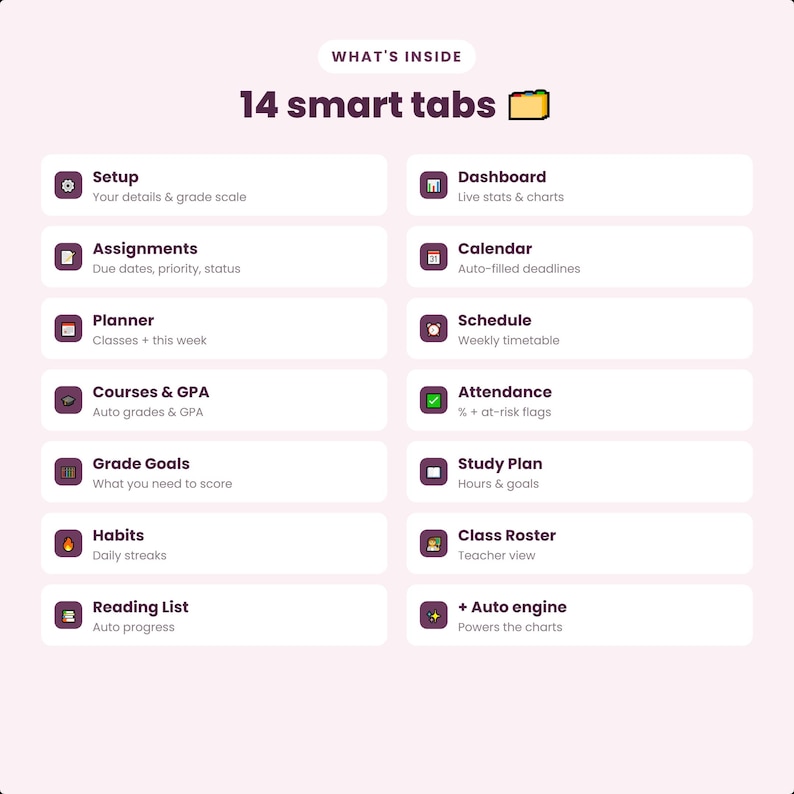
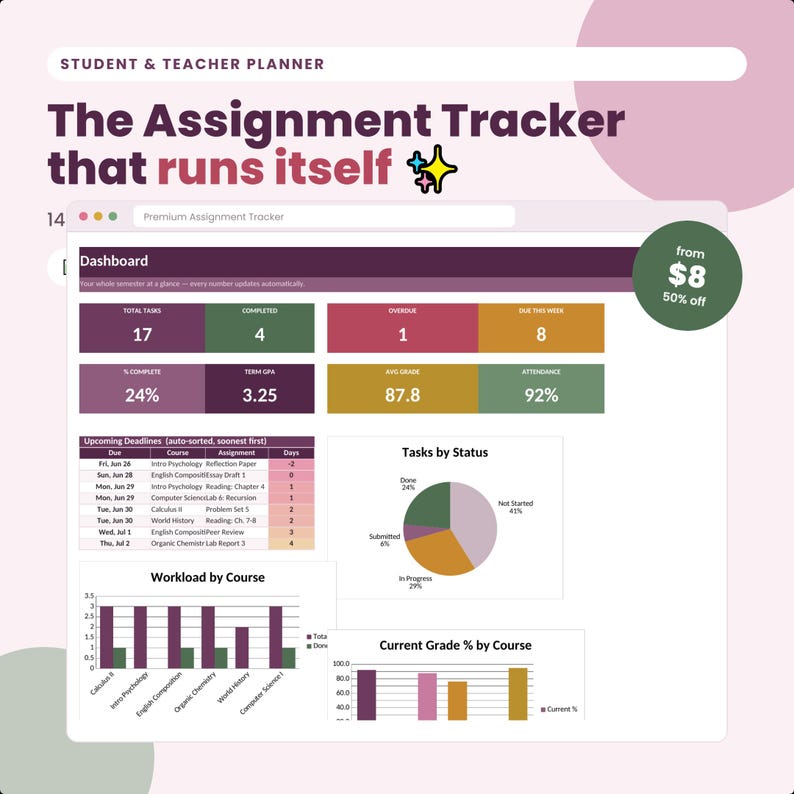
A student assignment tracker built in Google Sheets fixes exactly that. Type each assignment once and the sheet sorts by deadline, flags what's overdue, and shows a progress dashboard — so “what's due next?” is answered in a glance instead of a panic. For the 2026-2027 school year, here are the best trackers and companion tools from the Reassurix Etsy shop, starting with the Google Sheets pick that does the sorting for you.
Google Sheets + Excel · sort by subject, urgency or deadline · instant download
What makes a great assignment tracker?
“Assignment tracker” covers everything from a blank spreadsheet to a full study system. The ones worth your money share three things.
The best trackers re-order your list by due date or urgency in one click. You should be able to open the sheet and see the next thing to do at the top — not scroll and hope.
A live dashboard — done vs. outstanding, by subject — turns a wall of rows into a picture. Seeing “3 overdue in Chem” lands harder than reading it in a list.
A Google Sheets tracker opens free on a Chromebook, laptop or phone with no app to buy — the difference between a tool you use daily and one you open once.
The 6 best student assignment trackers & planners for 2026-2027
1Best overall — Student Assignment Tracker for Google Sheets & Excel
This is the pick if you just want deadlines under control. The Student Assignment Tracker logs every assignment, homework and project in one place, sorts by subject, urgency or deadline, and shows an auto-updating progress dashboard. You get both a Google Sheets and an Excel version, so it opens on whatever your school runs — Chromebook, laptop or phone.
2Best digital planner — Back to School Student Planner 2026-2027 (GoodNotes)
Want a full planner, not just a tracker? The Back to School Student Planner is a hyperlinked PDF for the iPad — weekly spreads, assignment pages and calendars you tap between. Import it into GoodNotes and write your plans by hand if that's how you focus.
3Best for Notion — Notion Student Template Bundle
If you'd rather keep assignments and notes in one workspace, the Notion Student Template Bundle pairs an assignment tracker with a note-taking planner — deadlines, readings and class notes linked together in Notion, free on every device.
4Best for focus — Notion ADHD Planner (Time Blindness Buster)
If deadlines slip because time feels invisible, a tracker alone won't fix it. The Notion ADHD Planner prioritizes tasks by urgency and is built as a time-blindness buster — ideal for students who know what's due but struggle to start.
5Best for homeschool — Student Attendance Tracker Bundle
Homeschooling families and co-ops need records, not just reminders. The Student Attendance Tracker Bundle (Google Sheets & Excel, live dashboard) keeps clean attendance records alongside your assignment tracking — useful for portfolios and reporting.
6Best money tool — Ultimate Budget & Debt Payoff Tracker
College runs on more than deadlines. The Ultimate Budget & Debt Payoff Tracker (Google Sheets/Excel dashboard) helps students manage tuition, textbooks and part-time income in the same spreadsheet muscle memory as their assignment tracker.
$7.99 each · instant digital download · Sheets, Excel, GoodNotes & Notion
Google Sheets vs. Notion vs. paper: which tracker fits you?
The right format is the one you'll open on a Sunday night. Here's the trade-off.
| What matters | Google Sheets / Excel | Notion | Paper planner |
|---|---|---|---|
| Auto-sort by deadline | Yes, one click | Yes, filters | No |
| Progress dashboard | Yes, built-in charts | Yes, views | No |
| Overdue flags | Yes, automatic | Yes | Manual |
| Stores class notes too | Limited | Yes, best | Yes, by hand |
| Opens anywhere free | Yes | Yes | N/A |
| Best for | Deadline control | Notes + tasks in one | Quick jotting |
Bottom line: choose a Google Sheets assignment tracker when your priority is never missing a due date and you want automatic sorting and charts; choose Notion when you want assignments and notes in one linked workspace. Plenty of students run the Sheets tracker for deadlines and a Notion bundle for notes.
How to set up your Google Sheets assignment tracker
- Download after checkout — delivery is instant, including the Excel workbook.
- In Google Sheets, open the included link and choose File → Make a copy to create your own private version in Google Drive.
- Add each assignment with its subject, due date and status. Do a “brain dump” of the whole syllabus in one sitting at the start of term.
- Let it sort. The dashboard and deadline flags update themselves — open it Sunday night and the top of the list is your week.
- Clear the sample data in one step once you see how it works, and make it yours.
Who this assignment tracker is for
This fits high school and college students juggling multiple classes and deadlines; homeschool students and parents who want a clean record of work and progress; anyone whose grades slip from missed due dates rather than hard material; and students who want a system on their phone, not a planner they leave in a locker. If you've ever finished an assignment and forgotten to turn it in, a tracker that flags status is worth far more than it costs.
Frequently asked questions
What is the best student assignment tracker for Google Sheets?
The Reassurix Student Assignment Tracker — it logs every assignment, homework and project in one sheet, sorts by subject, urgency or deadline, and shows an auto-updating progress dashboard. It comes in Google Sheets and Excel, so it works on any laptop, Chromebook or phone.
Is a Google Sheets assignment tracker better than a paper planner?
For deadline management, yes. Sheets calculates what's due next, flags overdue work automatically, and re-sorts by class or date in one click. Paper is faster to jot in but can't tell you which assignment is most urgent.
How do I use a Google Sheets assignment tracker?
Open the shared link, choose File → Make a copy, then type each assignment with its subject, due date and status. Built-in formulas handle progress charts, sorting by deadline and highlighting what's due soon. No spreadsheet experience needed.
Does the assignment tracker work in Excel too?
Yes. It includes an Excel workbook and a Google Sheets version of the same tool, with identical automation and dashboard — use whichever your school provides.
Is a Google Sheets or Notion assignment tracker better for students?
Sheets is best for straightforward deadline and grade tracking with automatic sorting and charts, and it opens anywhere without an app. Notion is best if you also want notes, readings and projects in one linked workspace. Many students use both.
Can I reuse the assignment tracker every semester?
Yes. It's a one-time download. Make a fresh copy in Google Drive each semester and clear the sample data in one step. No subscription, nothing to rebuy.
Final thoughts
Grades are lost far more often to forgotten deadlines than to hard material. A Google Sheets assignment tracker quietly removes that failure mode — it holds every due date, sorts them for you, and turns Sunday-night dread into a ten-second glance at what's actually next. Set it up once at the start of the term, and let the sheet do the remembering for the rest of 2026-2027.
Keep reading: our guides to the best digital teacher planners for 2026-2027 and the best ADHD planners for 2026.
See the full assignment tracker, dashboard and everything included on the Reassurix Etsy listing.
Get the Student Assignment Tracker →
Join the conversation