.png)
It's a Tuesday in October, a parent emails asking why their kid keeps getting marked absent, and you're flipping back through six weeks of a paper roll book trying to reconstruct what actually happened. The marks are all there. You just can't see the pattern without adding it up by hand, row by row.
That gap — between recording attendance and actually being able to read it — is where most attendance systems quietly fail teachers. It isn't that the marks are missing. It's that a paper grid or a plain spreadsheet gives you a wall of P's and A's and leaves the interpreting to you, usually at the exact moment you have the least time for it.
And the stakes have climbed. Roughly 1 in 5 U.S. students was chronically absent in the 2024–25 school year — around 22% by RAND's estimate — still well above the pre-pandemic rate of about 15%. Chronic absenteeism is defined as missing 10% or more of school days, and that's precisely the kind of number a person cannot eyeball from a roll book. You need something that counts for you.
This is the gap a connected student attendance tracker spreadsheet is built to close — one where the percentages, the flags, and the charts update themselves the moment you mark a student present or absent.
Instant download · works in Google Sheets or Excel
What is a student attendance tracker spreadsheet, exactly?
A student attendance tracker spreadsheet is a single digital file — built in Google Sheets or Excel — where you mark who's present, absent, tardy or excused, and the sheet does the counting for you: attendance percentages per student, running totals per month, and, in the better ones, a dashboard that turns all of it into a picture you can read in a glance.
The good ones aren't just tidy grids. They use formulas to do the interpreting — calculating each student's rate, flagging anyone who crosses a chronic-absence line, breaking totals down by month and by class — so the tracker is doing the analysis, not just holding your marks.
The format matters more than people expect. A printed roll book you fill in by hand is still, functionally, a stack of paper you'll have to add up later. A true attendance tracker lives in software like Google Sheets or Excel, where marking one cell updates a percentage, a flag, and a chart somewhere else automatically.
Why a paper roll book and a plain grid both run out of road
Paper isn't the enemy. It's fast and it never needs a login. The trouble is everything that happens after you've filled it in — the counting, the reporting, the "which students are trending toward trouble" question that a roll book simply cannot answer on its own.
Tallying attendance percentages for a class of thirty by hand is how a prep period disappears. Built-in formulas turn every mark into an instant, auto-updating rate — and flag the students who need attention before a parent conference, not after.
A wall of P's and A's looks fine until you add it up. A live dashboard with an At-Risk flag surfaces the kid who's quietly missed 12% of days, so chronic absence becomes something you catch early instead of discover at report-card time.
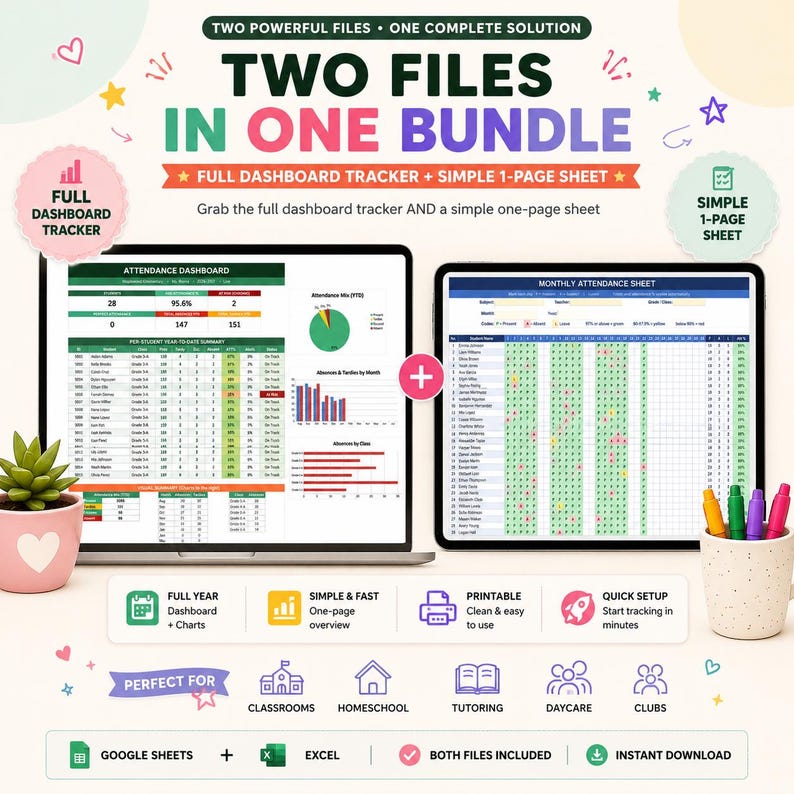
Some days you want a full system with a dashboard and 12 months of history. Other days you just want a clean sheet to take roll on in ten seconds. This bundle hands you both, so you're not forcing one tool to do a job it wasn't built for.
Google Sheets vs. Excel vs. a school portal: which actually makes sense?
This is where a lot of "attendance tracker" products quietly fall short — they're locked to one platform, or they assume you're working inside whatever system your district bought. That's fine right up until you're tutoring on a personal laptop, running a homeschool co-op, or teaching a Sunday school class with no portal at all.
A tracker built natively as both a Google Sheets attendance tracker and an Excel class attendance spreadsheet sidesteps all of that. Google Sheets is free and browser-based, so it opens the same on a Chromebook, a Windows laptop, a Mac, or your phone during hallway duty. Excel compatibility means the identical file works if you're a Microsoft 365 school instead.
The practical upshot: no subscription, no portal access required, and no district IT ticket standing between you and your own attendance data.
Inside the bundle: two trackers, two moods
Most attendance templates on Etsy are a single sheet: a grid you fill in. This is a bundle — buy once, and you get an automated system for reporting and a no-setup sheet for everyday roll call.
File 1 — the Comprehensive tracker (with live dashboard)
This is the full-year system. The dashboard shows every student's attendance percentage with automatic At-Risk and Perfect flags, driven by a chronic-absence threshold you control — set it to flag anyone over 10%, or wherever your line sits. Twelve month tabs come pre-built in school-year order, August through July, so you're not creating tabs in September.
Marking attendance is a dropdown, and the codes color themselves: Present, Tardy, Excused, Absent, Remote, Field Trip. Tardies are tracked separately so you can see the pattern, but they still count as present for the rate — no student gets unfairly dinged for showing up late. Add a student once on the roster and every month tab and the dashboard update on their own. You also get a built-in pie chart plus by-month and by-class charts, and the whole thing is customizable: school, teacher, classes, codes and colors. It's set up for 28 students, and you can add more.
File 2 — the Simple one-page sheet
This is the ten-second tool. One clean sheet, one month, no setup and no learning curve. You just type P / A / L and the cells color themselves green, red and yellow. The attendance percentage auto-calculates and color-codes itself too — 75%+ green, 50–74% yellow, below 50% red — so a struggling student is visible without you reading a single number. There's a fill-in header for subject, grade or class, teacher, month and year, it prints clean on US Letter or A4, and it tracks up to 30 students.
What actually lands in your download
You get the Comprehensive Excel workbook (12 month tabs plus a roster, a Setup tab and a Start-Here guide), the Simple one-page Excel sheet, and Google Sheets versions of both that you open and copy with File → Make a copy. Sample data is already filled in so you can see everything working — then clear it in one step and make it yours.
A week in the life: how this tracker actually gets used
Picture a normal Monday. First period starts, you glance down the roster and click the dropdown — Present, Present, Tardy, Absent — down the class. The cells color themselves as you go, so a row of red is obvious without you thinking about it.
Wednesday, a student is out for a school trip. You mark Field Trip instead of Absent, and the rate holds steady, because the code knows the difference. Friday afternoon, you open the dashboard. One student has crossed your 10% line and is now flagged At-Risk — in yellow, before it becomes a conversation with an administrator, not after.
Then it's conference night. A parent asks about their child's attendance, and instead of flipping through paper, you pull up that student's percentage and the by-month chart on your laptop. Two months later, when you need a quick roll sheet for a substitute, you print the Simple one-page sheet and leave it on the desk. Same bundle, completely different job.
Paper roll book vs. plain spreadsheet vs. this bundle
| Feature | Paper / plain spreadsheet | Basic template | This attendance bundle |
|---|---|---|---|
| Auto-calculated attendance % | No, tally by hand | Sometimes | Yes, per student |
| Chronic-absence / At-Risk flags | No | Rare | Yes, threshold you set |
| Color-coded codes | No | Sometimes | 6 codes, self-coloring |
| Tardies tracked separately | Manual | Rarely | Yes, still count as present |
| Charts & by-month reporting | No | Uncommon | Pie, by-month, by-class |
| Printable one-page version | Yes | Sometimes | Yes, US Letter / A4 |
| Works in Excel and Google Sheets | Depends | Usually one | Both, both files |
| Reusable year after year | Rebuild manually | Sometimes | Yes, one-time purchase |
$7.99 · one-time purchase · instant digital download
Who this attendance tracker is (and isn't) for
This fits anyone who takes roll and wants to actually understand it without buying into a whole platform — classroom teachers who need clean records for parent conferences and reporting, homeschool parents keeping records and portfolios, tutoring and after-school programs, and daycare, preschool, Sunday school, clubs and camps where there's no district system at all.
It's probably not the right fit if your school already mandates a specific portal you're required to enter attendance into — though plenty of teachers still keep a copy like this on the side for the dashboard and the peace of mind. It's a manual-entry system by design: you mark the codes, and nothing syncs to a third party or leaves your own file.
How to set it up in under 10 minutes
- Download the files after purchase — delivery is instant, including both Excel workbooks.
- For Google Sheets, open the included copy link and choose File → Make a copy to create your own private version in Google Drive.
- Open the Start-Here tab in the Comprehensive file — it walks you through setup, adding students, taking attendance, and reading the dashboard, in that order.
- Add your students once on the roster and clear the sample data in one step. Every month tab and the dashboard fill in from there.
Frequently asked questions
What is a student attendance tracker spreadsheet?
A spreadsheet where you mark each student present, absent, tardy or excused, and formulas handle the rest: attendance percentages, chronic-absence flags, and a dashboard that turns the marks into charts you can read at a glance.
Does it work in Excel, or only Google Sheets?
Both. Every file in the bundle comes as an Excel workbook and as a Google Sheets version you open and copy with File → Make a copy.
What is included in the bundle?
Two tools. A Comprehensive tracker with a live dashboard, 12 month tabs and automatic reporting, plus a Simple one-page sheet for fast daily roll call. You get Excel and Google Sheets versions of both, with sample data you can clear in one step.
How many students can it track?
The Comprehensive tracker is set up for 28 students and you can add more. The Simple one-page sheet tracks 30 students per month.
Do tardies count against a student's attendance rate?
No. Tardies are tracked separately so you can see patterns, but they still count as present for the attendance percentage.
Can I use it for homeschool, daycare or a tutoring program?
Yes. It fits classrooms, homeschool records and portfolios, tutoring and after-school programs, daycare, preschool, Sunday school, clubs and camps — anywhere you take roll.
Do I need spreadsheet experience to use it?
No. Every formula is already built in. The Comprehensive file has a Start-Here tab that walks you through setup, and the Simple sheet is ready the moment you open it.
Can I change the chronic-absence threshold?
Yes. You set the threshold yourself — for example, flag any student over 10% absent — and the dashboard marks At-Risk and Perfect students automatically.
Can I print it?
The Simple one-page sheet is built to print on US Letter or A4, or to use digitally. The Comprehensive tracker is designed to be used on screen so the dashboard and charts stay live.
Final thoughts
None of this fixes why a student is missing school — that's a bigger conversation than any spreadsheet can hold. But a lot of attendance stress isn't about the marks themselves; it's about not being able to see, in the moment, which students are drifting and which are fine.
An attendance system that answers that question the second you open it — and hands you a clean sheet to print when you just need to take roll — removes a whole category of end-of-term scramble.
See both trackers, the dashboard, and everything included on the Reassurix Etsy listing.
Get the tracker on Etsy →
Join the conversation